Tower of Fantasy is an online open-world title with many qualities found in MMOs. This includes the ability to create your character. It also allows you to import other character presets if you aren’t feeling creative. But you may encounter an Unmatching Character Cannot Import error and wonder why preset codes are not working in Tower of Fantasy.
How to fix the Unmatching Character Cannot Import Tower of Fantasy
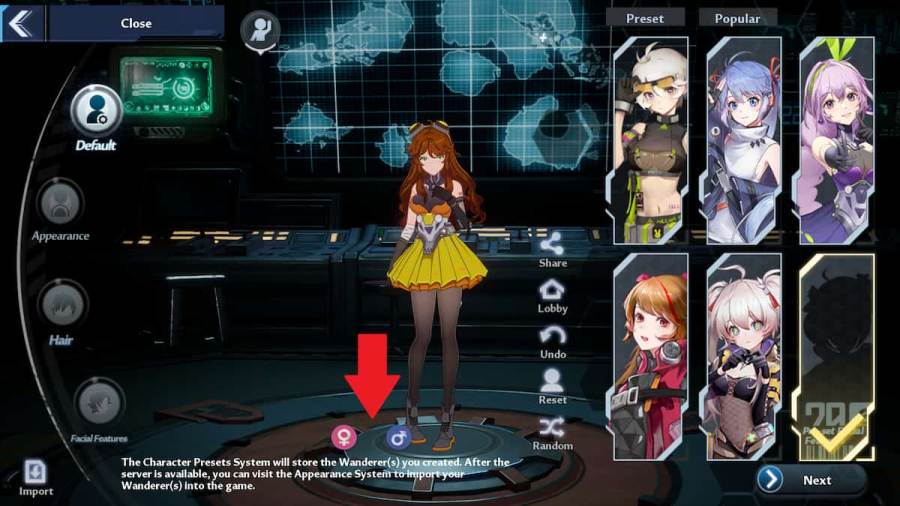
While this error is annoying, there is an incredibly easy fix for preset codes not working and getting theUnmatching Character Cannot Importmessage in Tower of Fantasy. All you have to do isswitchbetween the male and femaleavatarsat the bottom of the screen.
Related:Where to find Poultry Eggs in Tower of Fantasy
The reason for this is becausecodesaretiedto thegenders, or Wanderer 1 and Wanderer 2. If you are not on the correct avatar, then the Unmatching Character Cannot Import message will appear. Switching to the other avatar should fix this problem and let you import the preset code.
You should also verify that you are inputting thecorrect code. If you miss one character, you may receive a different preset, or the code may not work at all. If you are looking for various preset character codes, we have you covered with some of thebest onesandNaruto-themedcodes.

For more information on Tower of Fantasy, check outTower of Fantasy Dark Crystals – How to get and useandHow to join a crew in Tower of Fantasyon Pro Game Guides.