Players are able to switch their Switch Skills in combat for the first time in Monster Hunter Rise. The Sunbreak expansion adds many quality-of-life improvements, and the Switch Skill mechanic lets players equip multiple Skills at a time. The HUD, or Heads Up Display, shows the details of the equipped Switch Skill but may not be what players want to see all the time. This is how to remove the Switch Skill hover text in MHR Sunbreak.
How to turn off Switch Skill Info in MHR
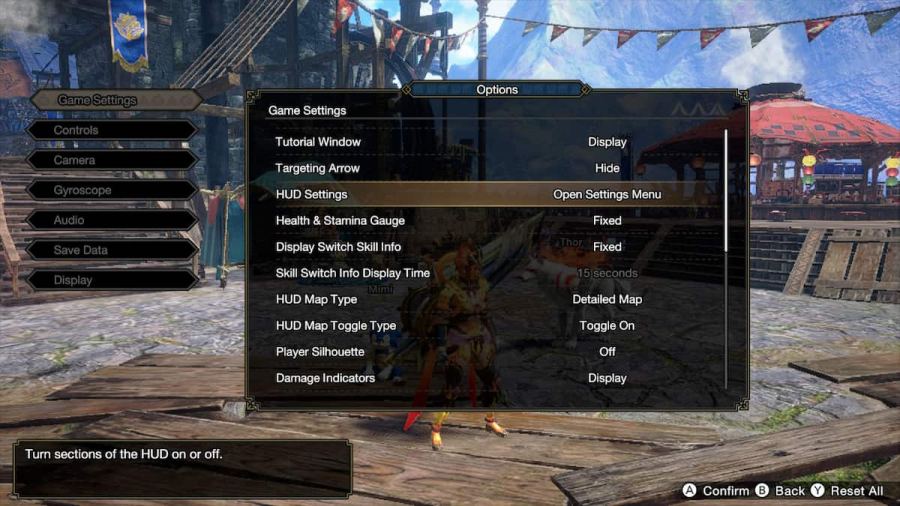
Players just have to go into their menu and go all the way to the right. Under theSystemsection of the menu, players then have to go toOptions. TheHUD Settingswill be in the first option,Game Settings,and will allow players to turn off any sections of the HUD that they want. TheSwitch SkillInfoshows the details of the equipped Switch Skill and can beuntickedto turn it off.
Related:How to fix ‘crash on startup’ error in Monster Hunter Rise Sunbreak

Should players disable the Switch Skill Swap Scroll HUD Setting?
The Switch Skill Swap Scroll displays either the Red or Blue Scroll that players have equipped. This is a relatively small icon that appears on the bottom center of the screen but can be distracting for some players who are not used to it being there. Ultimately, it is up to the individuals who feel comfortable with their equipped Switch Skills or don’t have any difference between their equipped Scrolls.
How to change Switch Skill loadouts
At theItem Box, players canManage Switch Skilland makeloadoutsfor their Scrolls. It is important to remember that players can only havetwo equipped Swap Scrollsat a time, and the loadouts that players have are for each color Swap Scroll. Players canRegisterandChangewhat each color Swap scroll from theSwitch Skill Loadoutsmenu.
For more Monster Hunter Rise guides, check outWhat is Buddy Recon in MHR Sunbreak? – How to use iton Pro Game Guides.