Sometimes, a game you purchased on Steam is just not for you. You’ll naturally want to return the game but may not know how. Here’s how to return a Steam game, as well as the limitations under which Steam will issue a refund.
How to return your Steam game
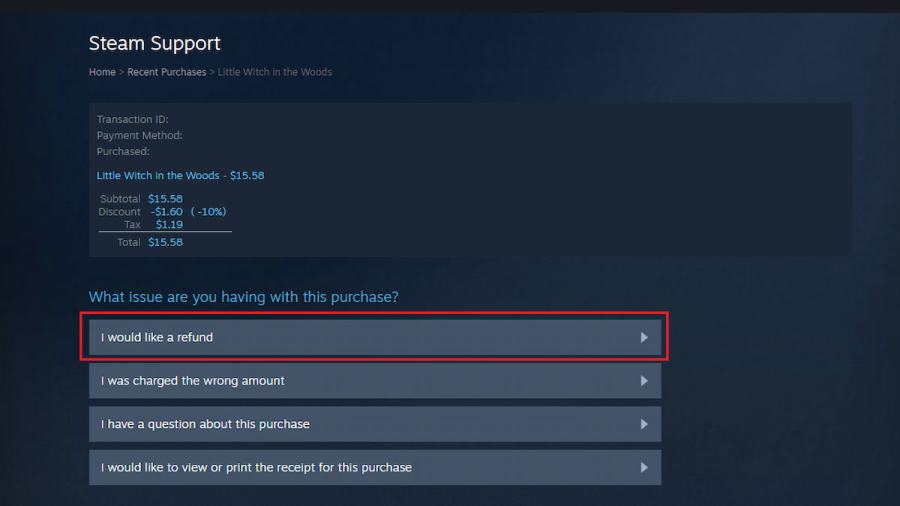
To request a refund for your Steam game, first go to theSteam Supporthub. Once there, selectPurchases, then choose the game you want to return. Below the purchase info, the optionI would like a refundwill take you to the return request page. Once there, select the reason you want to return the game and hitSubmit Request. If your request is approved, Steam will confirm and refund the money. If it is not approved, Steam will reach out and inform you via email of why it was rejected.
When is it too late to return a Steam game for a refund?
It’s understandable that you may not always immediately know that you want to refund a game. Sometimes, external factors make it where a player may need days or weeks to realize they no longer wish to own the game. That’s why Steamgives players up to two weeks to request a refundfor the purchased game. If it is more than 14 days after purchase, you may still submit a request, but it is likely to be rejected.
Related:How to cancel recurring subscriptions on Steam

Can I return a Steam game if I’ve played it already?
you may get a refund for your Steam game, even if you have started playing it already, within reason. When looking deeper atSteam’s policies on refunds, they confirm that you can return a game that has been played if it hasless than two hours of game timelogged. This means if you have played the game for two hours or more, it is no longer eligible for a refund.
Want to read more guides about Steam? If so, check outHow to change your Steam passwordon Pro Game Guides.