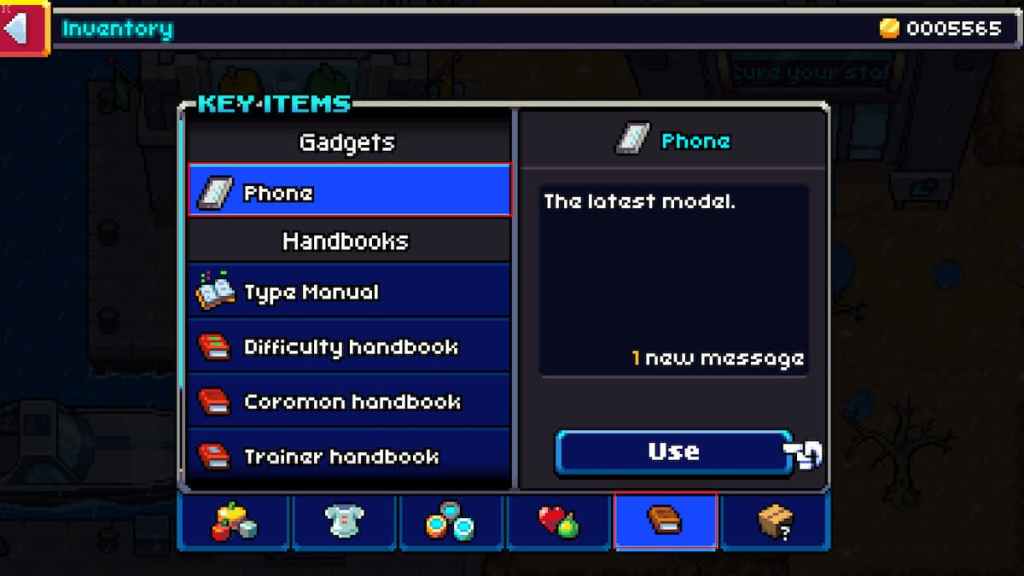
You set off on your Coromon adventure as an employee of Lux Solis. You are given a Gauntlet, a Coromon, and sent on your way. Of course, you brought your trusty phone with you, and throughout your journey will receive messages on your phone, but how do you read them?
How to use your phone in Coromon
To use your phone in Coromon to read messages, you need to press the Start Button on your controller or Esc on PC. Navigate to theItemsmenu on the right side of the screen. This will open up your inventory. On this screen, use the D-Pad or click on theBooktab, second from the last before the question mark box.
Related:Does Coromon support crossplay?

When on this tab, all you have to do next is click or press thePhone under Gadgets, then press or click use in the bottom right-hand corner of this window. Once done, another window will appear displaying the text message you have received.
It’s entirely optional to do this, but you never know when an important message will come through, so even if it is your mum being worried about you, it’s always worth reading it.