Being raided is one of the best feelings you can have on Twitch. It’s natural you’d want to celebrate. And what better way than playing a random clip from the streamer who raided you? Well this seemingly complex streaming command is actually very simple to set up, and you can celebrate being raided in a unique way every time. So here’s how you play a random clip from the streamer who raided you on Twitch.
Using Twitch.Guru to upgrade the Shout Out command
The basic gist of getting this cool feature to work is using the shout out command to play clips usingOBS. This method requires you to be streaming on OBS, so make sure you’re using that program before starting. The quickest and easiest way to get this method to work is throughTwitch.Guru’shandy tool. Head toTwitch.Guruand browse down toFree Tools. Select theShout Out Player. As listed in the details, this tool will play a random clip from the stream channel that is shouted out. You can also set this to achannel rewardso viewers can use the command as well.
Simply enter yourTwitch username,select if you want this to be a channel reward option, and set a few options such asMax Duration,Mute, andTurn text display off. Then, aBrowser Sourcelink will be created at the bottom of the page. We’re going to use that link in OBS.

Related:All banned words on Twitch – full list
Adding a Browser Source to your stream in OBS
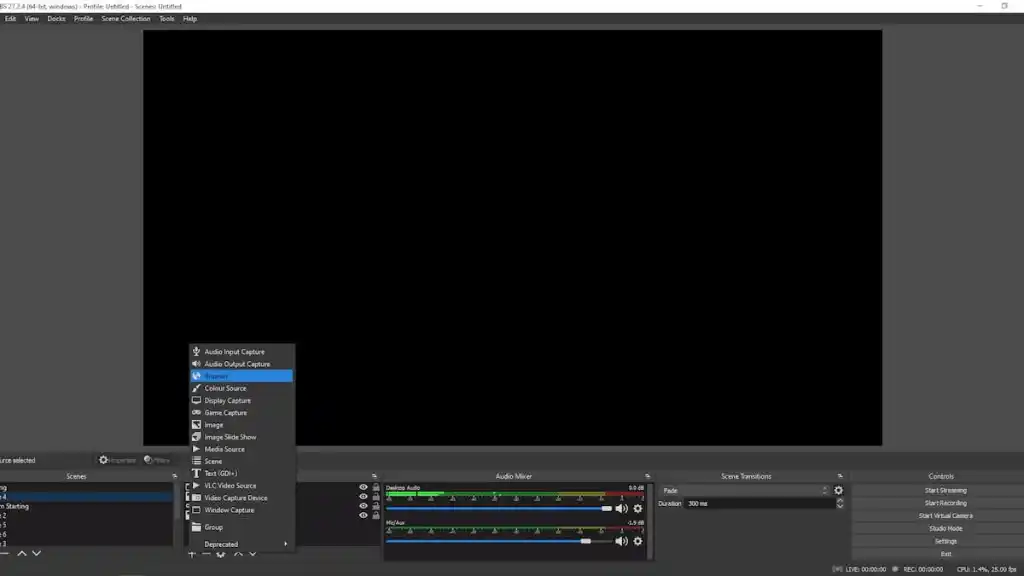
Launch OBS and on your streaming scene’s list ofSources, click the+ symbolto add a new Source. SelectBrowserfrom the menu, and in the URL section, use the link created in the Twitch.Guru website, the one labeledBrowser Source.From there you can edit the position of the clip in your scene, and otherwise change the size, etc.Then, next time you’re raided use theShout Out command, which is!soin addition to the user name of the person who raided you to play those clips. For example,!so (Insert User Name)without the brackets. Enjoy!
For more Twitch streaming ideas and guides, check outWhat is a Twitch Raid? Twitch Hosting and Raiding Guideon Pro Game Guides.