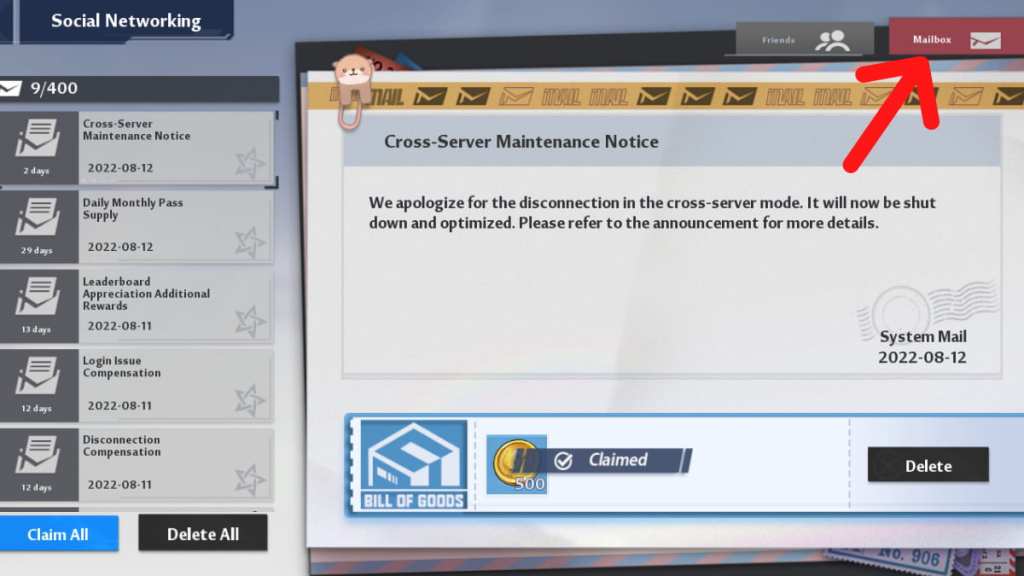
One of the most well-hidden features across gacha games is the mail menu, and Tower of Fantasy is no different. Accessing your mail is important to claimrewardsand read important announcements. Since mail expires, don’t wait too long before reading them. Read on to find out how to find your mail in Tower of Fantasy.
Where to find your mail in Tower of Fantasy
There are two ways to find your mail in the game. First, whenever you receive anew mail, you’ll see an envelope appearunder the mini-map, which you can directly click on to access. If you’re on a PC, hold the ALT button to get back your cursor to click the envelope.
Related:Can you hide the chat in Tower of Fantasy?

Alternatively, you can find your mail by heading to themenuby clicking the ESC button for PC and the honeycomb icon on the upper right of the screen for mobile. Then clickFriends, and switch to theMailbox tabon the upper right of the screen. This gives you full access to your mail. Remember that mail expires after some time, and any rewards attached will also disappear, so check your Mailbox regularly to avoid missing out!
Check out our guide onHow to unlock recipes in Tower of Fantasyto cook amazing food in the game.